Meet GeoFlow — a geometry canvas that moves
Build a triangle, raise its perpendicular bisectors, drop the circumcircle — then grab a corner and drag. The bisectors tilt, the center slides, the circle re-fits itself, and the theorem you half-remembered from school suddenly makes sense. Free, in your browser, and it works offline.

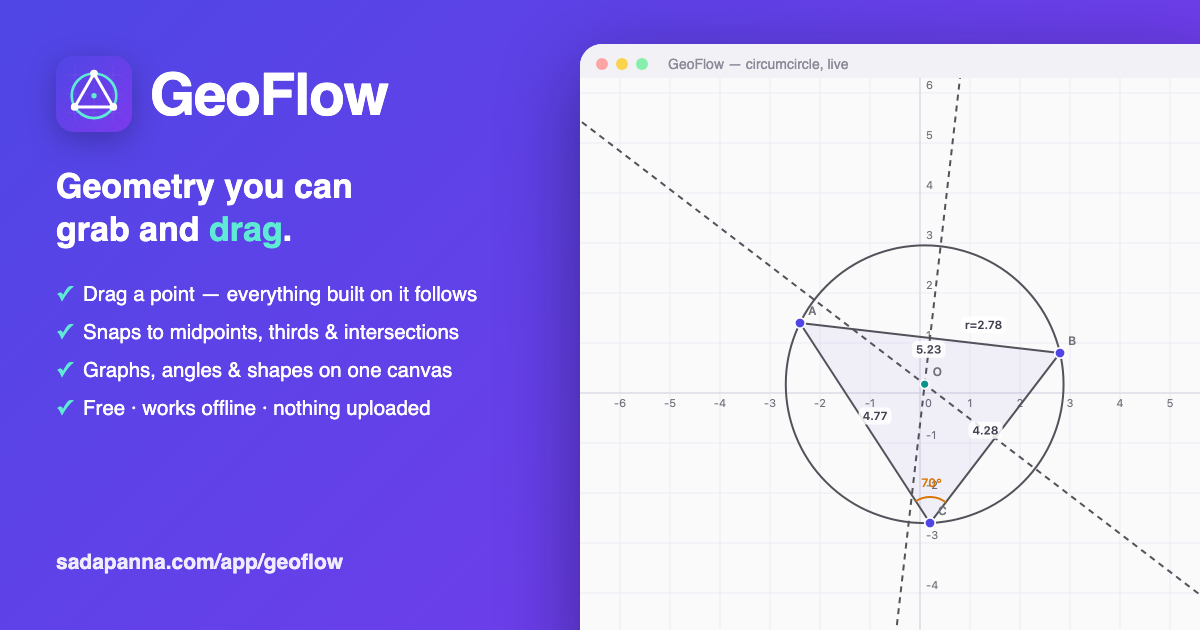
GeoFlow started with a small moment of disbelief. One of us was reading about circles and hit this line: through any three points that aren't on a straight line, there is exactly one circle. Not "at least one". Exactly one. That felt like something you should be able to see, not just accept. Draw three dots, find the circle, move a dot, watch the circle chase it. Simple.
Except doing that in existing tools wasn't simple. The good ones — and some are genuinely good — greet you with sixty-odd tools folded into nested menus. To build the circle properly you pick the polygon tool, then the perpendicular-bisector tool, then an intersection tool, then a circle tool, clicking objects in an order the software never explains. We counted once: about eighteen clicks across ten tool switches. By the end you've made the picture, but you've stopped thinking about the geometry.
So we built the tool we wished we'd had that afternoon. GeoFlow is a free geometry canvas with one rule behind every decision: the construction is the lesson, so getting there should be almost effortless — and once it's there, it should move.
Five tools, and the rest finds you
GeoFlow's toolbar has five things on it: Move, Point, Line, Circle, Shape. (Plus a Graph button — more on that below.) Everything else appears only when it's relevant. Select a segment and you're offered its midpoint, its perpendicular bisector, or a divide-into-n. Select three points and you're offered a triangle, the angle between them, or the circle through all three. Select two curves and you're offered their intersection.
This sounds like a small design choice. It changes everything. You never hunt through a menu for a tool whose name you don't know yet — you point at the things you care about, and the geometry that's possible with them shows up as buttons.
Snapping that tells you what it's doing
A quiet frustration in most geometry software: you place a point that looks like it's on the line, but isn't. Everything seems fine until you drag something and your construction falls apart, because the point was never actually attached. Teachers call this the drag test, and half of a beginner's constructions fail it.
GeoFlow won't let that happen silently. Before you click, it names what you're about to attach to — a little tag that reads Midpoint, or 1/3 point, or Intersection of TU, VW, or On circle — and highlights the object in question. If the tag isn't showing, you're placing a free point. There's no ambiguity to discover three steps later.
- Points snap to midpoints, thirds, quarters — any n-section of a segment — plus intersections, centers, and grid crossings.
- Lines snap to clean angles and to perpendicular or parallel with any line on screen, and the tag names which one ("⊥ to TU") while that line glows.
- Circles snap their radius to tidy values while you draw, so "a circle of radius 2" takes one drag, not a coordinate dialog.
Linked until you say otherwise
Here's our favorite detail. When you finish a line on that "⊥ to TU" snap, GeoFlow doesn't just draw a line that happens to be perpendicular right now. It records the relationship. Rotate the original line later and your perpendicular turns with it, exactly, forever. The right angle is a fact of the construction, not an accident of where you clicked.
And when you don't want the relationship anymore, select the object and tap Unlink. It keeps its position but forgets its parents — a midpoint becomes an ordinary draggable point, a bound line becomes a plain one. Constraints you can see, name, and remove: that's the deal.
Dragging is where geometry stops being memorization. The circumcenter isn't a definition anymore — it's the point you watched refuse to leave the intersection of those bisectors, no matter how hard you pulled the triangle around.
Graphs on the same canvas
Geometry class and graphing class use the same plane, so GeoFlow keeps them together. Type x^2/4 or
sin(x)*2 and the curve lands on the same numbered axes as your shapes. Points snap onto the curve and
slide along it. Lines intersect it. You can drop a few points along a parabola, box-select them, and turn them into
a polygon — which is a genuinely odd thing to do, and exactly the kind of odd thing that makes an idea stick.
Everything drags
Free points move; everything built on them follows live — bisectors, intersections, circles, angles, measurements.
Sizes on demand
One toggle shows live lengths and radii in grid units, updating as you drag. Turn it off and the canvas is clean again.
Instant regular shapes
Shift-drag from any point, pick triangle to hexagon or type n. The polygon stays perfectly regular while you resize it.
Visible dependencies
Hover anything and the objects it was built from light up. No mystery about why the center moved.
Yours, on your device
GeoFlow has no accounts and no server doing the math. Constructions save automatically to your browser — open the files panel and yesterday's work is there, thumbnails and all. You can export any construction as a small JSON file and hand it to someone, and once the page has loaded once, the whole app works with no connection at all.
Nothing you draw leaves your device. Same rule as InkFlow, same rule as everything we make: local first, no accounts, no data to sell because we never collect it.
The offline part matters more than it sounds. A classroom with flaky wifi, a tablet on a train, a kid at a kitchen table with mobile data that ran out — the canvas doesn't care. It's already there.
Who we made it for
Students meeting constructions for the first time. Teachers who want to show, not tell — the first thing GeoFlow opens with is that three-points-one-circle demo, ready to drag. And honestly, anyone who liked geometry once and wants to push shapes around for twenty minutes. It runs on anything with a browser, mouse or touch.
GeoFlow joins InkFlow as the second tool you can use on the site right now, free, no sign-up. If you build something worth showing off — or find a construction it can't handle — we want to hear about it: hello@sadapanna.com.